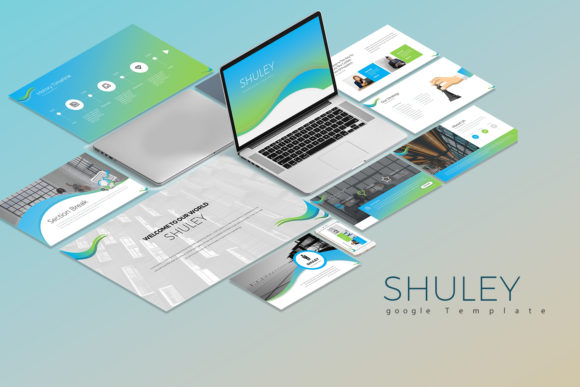
Mastering Modern Presentations with Shuley Google Slide
In the world of digital communication, a slide deck is rarely just a collection of bullet points anymore; it is a visual handshake. For designers, entrepreneurs, and content creators, the ability to present ideas with clarity and aesthetic appeal is non-negotiable. Shuley Google Slide Templates enters this space not just as a set of files, but as a comprehensive design system. It bridges the gap between the rigidity of corporate requirements and the fluidity of creative expression. If you have ever struggled to make a business proposal feel fresh or a portfolio review feel professional, understanding the mechanics behind a template like Shuley can transform your workflow.
The Anatomy of a Scalable Visual Identity
At its core, Shuley is defined by its duality. It is described as clean, creative, and simple, yet it possesses a unique scalability that makes it suitable for a wide array of contexts. The visual personality of this template set leans heavily into modern typography and structured whitespace. It doesn't scream for attention with chaotic layouts; rather, it commands it through balance.
The package includes 30 unique slides (60 total when accounting for white and dark background versions), offering a 16:9 aspect ratio. This standard ratio ensures your content looks native on everything from a conference room projector to a laptop screen during a Zoom call. The inclusion of a single, cohesive color scheme across both background variations is a strategic choice. It forces consistency in your brand identity, preventing the "rainbow effect" that often plagues amateur presentations. By sticking to a refined palette, the template allows your actual content—your images, your data, and your narrative—to remain the hero.
Practical Flexibility: From Boardroom to Brainstorm
One of the most common pitfalls in presentation design is choosing a template that is either too sterile for a creative pitch or too whimsical for a financial report. Shuley Google Slide Templates navigates this by focusing on structure over ornamentation. The design acts as a vessel. For the entrepreneur, this means the slides can adapt to a pitch deck without looking generic. For the marketer, it provides the necessary hierarchy to break down complex campaign metrics.
The practical application of these slides extends into editorial design and packaging design presentations. When presenting a new logo concept or a product line, the background should never compete with the foreground. Because Shuley utilizes vector icons and fully editable charts, you can seamlessly integrate complex visual assets. The charts are particularly noteworthy; being editable in Excel means your data visualization remains dynamic. You aren't pasting static screenshots of numbers; you are presenting live, adaptable data sets. This is crucial for maintaining credibility in business presentations where accuracy and agility are paramount.
Technical Workflow and Customization
For the busy content creator or small business owner, time is the most expensive resource. A template is only as good as its ease of use. Shuley addresses this through "smart" customization features. The image placeholders, for instance, allow for drag-and-drop functionality, drastically reducing the time spent resizing and cropping. This is a small technical detail that has a massive impact on production speed.
Furthermore, the file structure (2 PPTX files optimized for Google Slides) acknowledges the shift toward cloud-based collaboration. While it includes documentation and a quick guide, the learning curve is intentionally shallow. The fully editable nature of the elements means you aren't locked into the creator's specific vision. You can adjust the visual hierarchy by enlarging headlines or repositioning text blocks to suit your specific narrative flow. This flexibility is what separates a rigid PDF from a living design asset.
Font Integration and Typography Strategy
A critical component of Shuley’s aesthetic is its typography. The template relies on free fonts, which is a significant advantage for freelancers and startups watching their overhead. However, the instruction to "install fonts before opening" is a step many overlook, leading to layout shifts and broken designs.
From a design perspective, the choice of typeface within a template dictates the mood. Whether the template utilizes a sans serif font for a clean, Swiss-style look or pairs it with a serif font for contrast, the typography sets the tone. When you open the file, take a moment to analyze the font pairing. Notice how the weight of the headlines anchors the page while the body text ensures readability. If you decide to swap fonts to match your existing brand guidelines, ensure you maintain this hierarchy. A common mistake is replacing a geometric sans serif with a handwritten font or script font for body text, which can severely hamper legibility on screen.
Enhancing Brand Perception Through Design Consistency
Your presentation is a reflection of your brand identity. Using a template like Shuley isn't about taking a shortcut; it's about professionalizing your communication. When an audience sees consistent margins, aligned elements, and high-resolution graphics, they subconsciously attribute those qualities to your business. It signals attention to detail.
Consider the impact on audience engagement. A cluttered slide with misaligned text boxes creates cognitive load—the audience spends energy trying to decipher the layout rather than listening to you. By using a premium font style and a structured grid system, Shuley reduces this friction. It allows the viewer to absorb information quickly, keeping them focused on your message. This is vital for social media graphics derived from slides (such as Instagram carousels or LinkedIn documents), where scroll-stopping power depends on immediate visual clarity.
Evaluating Fit and Final Polish
Before committing to any template for a major project, it is wise to perform a "stress test." Open Shuley Google Slide Templates and try to break it. Insert a complex chart. Paste a long paragraph of text. Drop in a low-resolution image. How does the layout hold up?
Because the template is multipurpose, it should accommodate varying amounts of content without looking empty or overflowing. Check the documentation & quick guide file included in the package. Often, these files contain specific instructions on how to manipulate the Excel editable charts or utilize the vector icons