Photography Portfolio Template: A Modern Canvas for Your Visual Story
Every photographer, designer, or creative professional eventually hits a point where their work speaks for itself, but the presentation feels… off. You’ve got the stunning images, the cohesive project series, the client testimonials. What’s missing is the vessel—the layout that frames your talent without competing with it. Enter the Photography Portfolio Template, a meticulously crafted InDesign template designed for those who believe in the power of minimal, neutral, and contemporary presentation. This isn’t just another design file; it’s a structured editorial system built to showcase your visual narrative with clarity and sophistication.
Understanding the Core Design Philosophy
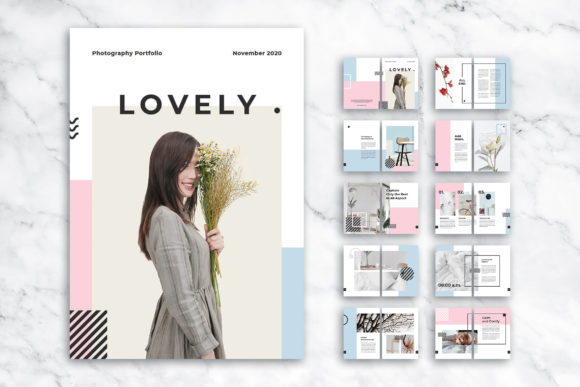
At its heart, the Photography Portfolio Template is built on a foundation of modern editorial design. It embraces a clean, elegant layout that prioritizes content over clutter. The visual personality is one of quiet confidence—think of a high-end gallery catalog or a sophisticated brand lookbook. It uses a contemporary style that feels both timeless and current, avoiding fleeting design trends in favor of structured simplicity. The neutral color palette and ample white space create a sense of calm professionalism, allowing your photography or design work to become the undeniable focal point. This template understands that for a photographer or creative agency, the portfolio is the primary marketing asset, and it should communicate competence and taste instantly.
What makes this particular design asset stand out is its versatility and thoughtful construction. It comes as a 20-page fully editable InDesign template in the international A4 format, complete with a 3 mm bleed for print-ready precision. The inclusion of both INDD and IDML files ensures compatibility across different versions of Adobe InDesign, while the EPS files offer flexibility for other workflows. The 300 DPI resolution and CMYK color mode are standard for professional printing, eliminating guesswork when you’re preparing for a client meeting or a gallery submission. The character and paragraph styles included are a huge time-saver, allowing you to apply consistent typography across the entire document with a single click. This attention to detail transforms the template from a simple layout into a powerful tool for brand consistency.
Practical Applications Across Creative Fields
While the name suggests a specific use, the true strength of the Photography Portfolio Template lies in its universal application. For a professional photographer, it’s the obvious choice for creating a client-facing portfolio that feels bespoke and intentional. But its utility extends far beyond. A graphic designer can use it to present a branding project, showcasing logos, color palettes, and mockups in a cohesive sequence. An event organizer could compile a proposal or recap, using the structured pages to outline timelines, venue shots, and sponsor acknowledgments. Creative agencies will find it invaluable for pitching new clients, as the clean layout allows them to present case studies and strategic thinking without visual noise.
Consider the practical scenarios where this template shines. A freelance marketer could use it to create a media kit that highlights campaign results and client testimonials with visual punch. A blogger or content creator might assemble a pitch deck for brand partnerships, using the elegant layout to demonstrate their audience reach and aesthetic sensibility. Even small business owners in fields like interior design, artisan crafts, or boutique retail can leverage it to create lookbooks or product catalogs that feel premium and professional. The key is that the template provides a proven structure, freeing you to focus on curating your content and telling your story. It’s a creative font for your entire project layout, in a sense—a typeface for organizing visual information.
Making the Template Work for You: A Practical Guide
Adopting a new design template is more than just dragging and dropping your images. To get the most out of the Photography Portfolio Template, start by evaluating your content. Sort your best work into logical categories or project narratives. The 20-page count is generous, but be selective—quality always trumps quantity. Before you even open the InDesign file, sketch out a rough sequence. What’s the story arc? Do you open with your strongest piece or build up to it? The template’s grid-aligned layout is your best friend here; it ensures that even if you’re not a seasoned layout artist, your pages will look balanced and intentional.
Next, focus on customization. While the template uses free fonts for accessibility, don’t be afraid to experiment with font pairing. The clean structure works beautifully with a combination of a strong sans serif font for headlines and a highly readable serif font for body text. This creates a clear visual hierarchy that guides the viewer’s eye. Play with the included styles to see how different typographic treatments affect the mood. Remember, the goal is to enhance your work, not overshadow it. The template’s fully layered structure makes this experimentation non-destructive; you can tweak and adjust without starting from scratch.
Finally, consider the final output. If you’re creating a digital PDF to email, ensure all images are high-resolution and links are updated. For a printed portfolio, the bleed settings are already perfect—just remember to extend your background colors or images to the bleed line to avoid white edges after trimming. The template’s CMYK color mode means what you see on a calibrated monitor will be close to the final print, but always request a proof for critical projects. This level of professionalism in presentation can significantly influence brand perception, signaling to clients that you value quality and attention to detail in every aspect of your work.
In a crowded marketplace, a well-presented portfolio is a silent ambassador for your brand. The Photography Portfolio Template offers a reliable, elegant, and highly customizable foundation for that presentation. It’s a practical design asset that respects your content while elevating its impact, whether you’re closing a new client, applying for a grant, or simply documenting your creative journey. By leveraging its structured editorial layout, you can create a portfolio that feels both personal and professional, a true reflection of the modern creative’s need for tools that are as thoughtful and effective as the work they produce.